
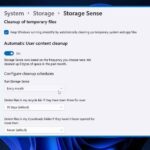
A hard disk or SSD that’s almost full is one of the worst things that can happen to your computer. When there’s barely any space left, your system slows down, apps crash, and everything starts feeling laggy. The only way to fix this is by clearing out the files that are eating up your storage. Windows 11 makes this easier with a built-in tool called ‘Storage Sense’, which helps clean your PC automatically. What is Storage Sense Storage Sense is like a smart cleaner for your Windows 11 laptop. It quietly removes junk such as temporary files, leftover system files, and old downloads. You can also customise it so it deletes only the types of files you choose, so nothing important gets removed by mistake. When used with OneDrive, Storage Sense can even convert unused local files into online-only versions. This means the files stay safe in your OneDrive cloud, but they don’t take up space on your device. How to free up space using Storage Sense on your Windows 11 computer Follow these simple steps to use Storage Sense: If your laptop starts slowing down or acting strange, it’s not always a serious problem. Sometimes, it just needs a little digital cleanup. Storage Sense in Windows 11 is a simple yet powerful tool that helps you keep your system organized and clutter-free.
The post appeared first on .

